

How to Exclude Empty WordPress Categories
By default, ClassiPress includes listing all categories so your site visitors are able to post a new ad and place it in a category even if it’s empty. Otherwise, they wouldn’t even know the category exists and it’s pointless to even have it. With that being said, a couple of you have asked me how to remove empty categories from the ClassiPress navigation which is actually quite easy.
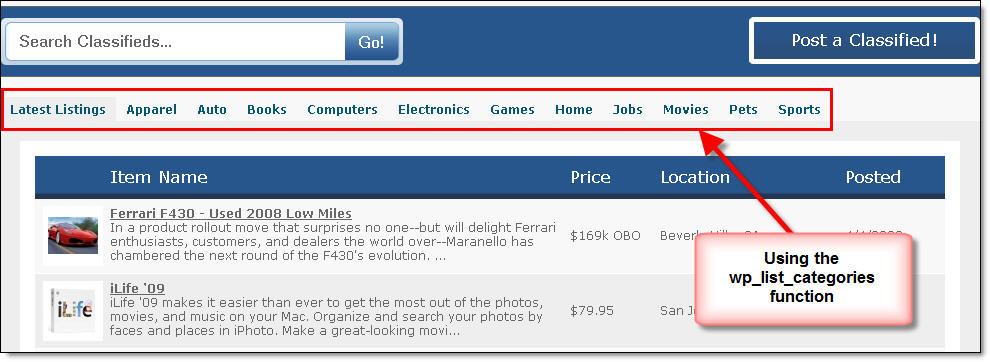
ClassiPress uses the standard WordPress function wp_list_categories which allows you to pass certain parameters into it and alter the results. All of the parameters have certain default values if you don’t pass anything into the function it just uses the defaults.
For example, in the index.php file do a search for wp_list_categories and you’ll find something like this:
wp_list_categories('show_count=0&title_li=&depth=1');
As you can see it is passing in three different parameters which basically says:
- show_count=0 – Don’t show the category count ( i.e. Shoes (3) )
- title_li= – Don’t show the default header (i.e. Categories) which is equal to nothing on purpose
- depth=1 – Only show the first level of categories. If you change this to 2 or 3, it will show you sub categories
These are only three out of 15+ parameters you can set to achive different settings. So, if you wanted to remove all empty categories from the list, you would add the following parameter to the string –> hide_empty=0. See the example below as to how you would add it to the existing function call.
wp_list_categories('show_count=0&title_li=&depth=1&hide_empty=0');
Pretty easy huh? You should play around with the other parameters and see how they affect your category listing. The WordPress codex (their tech docs) provides some great examples and is a good place to start learning how WordPress works under the covers.
Comments (8)
I started working with version 2.9.2; This is the snippet from the index.php:
‘show_count=0&hide_empty=true&orderby=name&order=asc&title_li=’
I had already changed ‘hide_empty=true’ to ‘hide_empty=0’ before reading your article. I now realize that this was the intended default. No problems on my end. Just reporting.
do they show from the start and if they not show how do i set them?
how can choice like 4 categories instead of one when posting ?????
what if i created 4 dropdown how can i display in 4 new ad that submited instead of one user
Im trying to show empty categories it that possible??
Toggle the “hide_empty=0” from 0 to 1 and it will hide/show your empty categories.
The toggle doesn’t want to work when changed to 1, still doesn’t show the empty categories… any ideas. Thanks
when ever there is empty category in word press it gives me a message
Not Found
Apologies, but we were unable to find what you were looking for. Perhaps searching will help.
Is there way to remove this
Thanks in advance
Discussion is closed.